
depicus
changing the digital world one bit at a time...


Introduction
It's all about money or maybe just to make life easier but either way Wake on Lan has something to offer you.
What is Wake-on-Lan
It depends on who you are, there are two companies who are claim credit, and maybe Al Gore and Microsoft will claim credit soon, for the technology behind Wake on Lan (WoL). Both AMD and IBM claim on their web site that WoL was their idea but thankfully we all benefit from the idea. WoL is both a hardware and software solution to allow a computer to be woken up remotely. Much like a modern television set, a computer that is Advanced Configuration Power Interface (ACPI) compliant can be turned on remotely, note that while you can currently only turn your television set on from within a certain distance WoL (and our WoL for ASP) allows you to remotely start a computer from anywhere in the world, that is as long as it has an internet connection.
Unlike Wake on Modem, which doesn't require any special software, WoL requires a special software program to send a signal to the network card to make it work.
About Magic Packet
The Magic Packet is at the heart of Wake on Lan although it is not as magic as would first appear. The basic premise is that a specifically formatted packet send over a network is send to every network card and identifying features in this packet allow the network card to identify that the magic packet is intended for it. All the other cards therefore reject or rather dispose of the packet. It is analogous to standing in a crowded room of people and shouting out somebody's name, where nobody in the room has the same name, although everybody would hear you hopefully the only person to answer would be the person who's name you have just called out.
Wake-on-Lan Hardware
To use Wake on Lan you will need at minimum a motherboard and a network card that support Wake on Lan.
Network Cards
We currently use the Intel P100+ and 3Com cards although this is by no means a recommendation.
Motherboards
There are two types of motherboard that support Wake on Lan
Cabling
The two main things to remember about cabling are;
1. The majority of WoL cards require a cable connection between the motherboard and the network card. This is a three pin connection although some older cards and motherboards have two pin connections. To send the signal from the network card to the motherboard this cable has to be connected. There is a specification that would allow the card itself to pass the signal through the PCI bus but we have yet to see or test these cards or motherboards.
2. Your network card must be cabled into some form of network. This can be BNC, RJ45 or even Fibre, indeed the WoL protocol is topology and transport protocol independent so TCP/IP or IPX/SPX could be used to send the magic packet.
Technical Issues aka Problems with Wake on Lan
The Key Stages of Wake on Lan and the Magic Packet
Wake on Lan (WoL) relies on a WoL enabled network card, we currently use Intel Pro 100 cards, and a motherboard with a WoL connector. With these items when you power down your computer a small charge remains on the motherboard, enough to power the network card. Your computer is now ready to be woken up. A "Magic Packet" is sent from our WoL enabled programs, run on another machine or from an internal web server, to the network card which then powers on the computer. Great for starting machines before people get to work...
WoL technology can be very beneficial to your business but please remember that this technology relies on many factors to work properly. Because of this you should be aware of the following points.
Software
Once the machine is on do not turn it off with the power switch. Some cards require a flag to be set which only happens when the operating system is allowed to power down the machine.
Hardware
Always check for the latest Network Card Bios updates - while testing we noticed that both Intel and 3Com cards sometimes needed a flash update for WoL to work.
Make sure you enable the WoL in the motherboard bios and on the Network card. Check your manufacturers web site or manual for further details on how to do this.
Make sure you connect the cable to the board - you would be surprised !
A handy hint is, if the machine is off and the light on your hub is not on then the computer does not have the standby power for the card enabled. Without this the computer cannot receive a WoL command.
Wake on Lan over the Internet (or why is it such a pain in the
****)
"IP directed broadcasts are used in the extremely common and popular "smurf"
denial of service attack, and can also be used in related attacks.
An IP directed broadcast is a datagram which is sent to the broadcast
address of a subnet to which the sending machine is not directly attached.
The directed broadcast is routed through the network as a unicast packet
until it arrives at the target subnet, where it is converted into a
link-layer broadcast. Because of the nature of the IP addressing
architecture, only the last router in the chain, the one that is connected
directly to the target subnet, can conclusively identify a directed
broadcast. Directed broadcasts are occasionally used for legitimate
purposes, but such use is not common outside the financial services
industry.
In a "smurf" attack, the attacker sends ICMP echo requests from a
falsified source address to a directed broadcast address, causing all the
hosts on the target subnet to send replies to the falsified source. By
sending a continuous stream of such requests, the attacker can create a
much larger stream of replies, which can completely inundate the host
whose address is being falsified.
If a Cisco interface is configured with the no ip directed-broadcast
command, directed broadcasts that would otherwise be "exploded" into
link-layer broadcasts at that interface are dropped instead. Note that
this means that no ip directed-broadcast must be configured on every
interface of every router that might be connected to a target subnet; it
is not sufficient to configure only firewall routers. The no ip
directed-broadcast command is the default in Cisco IOS software version
12.0 and later. In earlier versions, the command should be applied to
every LAN interface that isn't known to forward legitimate directed
broadcasts."
Quoted from Cisco.
Packets and Ports used by Wake On Lan's Magic Packet
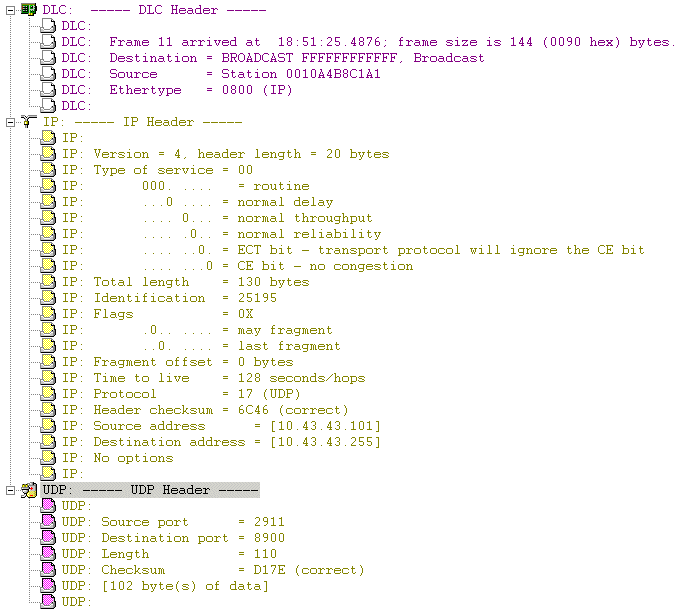
Below is a trace of the packet sent using a packet sniffer. Note that we specified port 8900 the source port is 2182 and the destination port is 8900 so if you are using a firewall you would need to open the port you use for UDP traffic.
How to calculate the subnet-directed broadcast address
1) Convert machine address to binary e.g. 10.208.20.1 =
00001010.11010000.00010100.00000001
2) Convert the Subnet Mask to Binary e.g. 255.255.240.0 =
11111111.11111111.11110000.00000000
3) Invert the Binary Subnet Mask e.g. 11111111.11111111.11110000.00000000
becomes 00000000.00000000.00001111.11111111
4) Or the machine address and the inverted subnet mask e.g.
00001010.11010000.00010100.00000001 Or 00000000.00000000.00001111.11111111 =
00001010.11010000.00011111.11111111 = 10.208.31.255